Landfills under My company are unsanitary landfill sites that belong to the company. They are company-level records, not facilities. Facility-level forms are not linked to this list.
These records identify each site so it can be selected on the annual DEP1 form (non-sanitary landfills). One DEP1 form exists for a given company, reporting year, and landfill.
Wild or illegal dumps reported on DEP2 are entered on that form. They are not managed in this list.
When the Landfills screen appears
The Landfills item under My company is shown when:
- the company has a DEP1 reporting obligation, or
- the company already has landfill records (for example from earlier years)
If neither applies, Landfills is not in the menu.
Anyone with access to the company can open the list when it is shown. Creating and editing landfills is limited to Company Admin.
To open the list:
- Sign in to the portal.
- Open My company.
- Select Landfills.
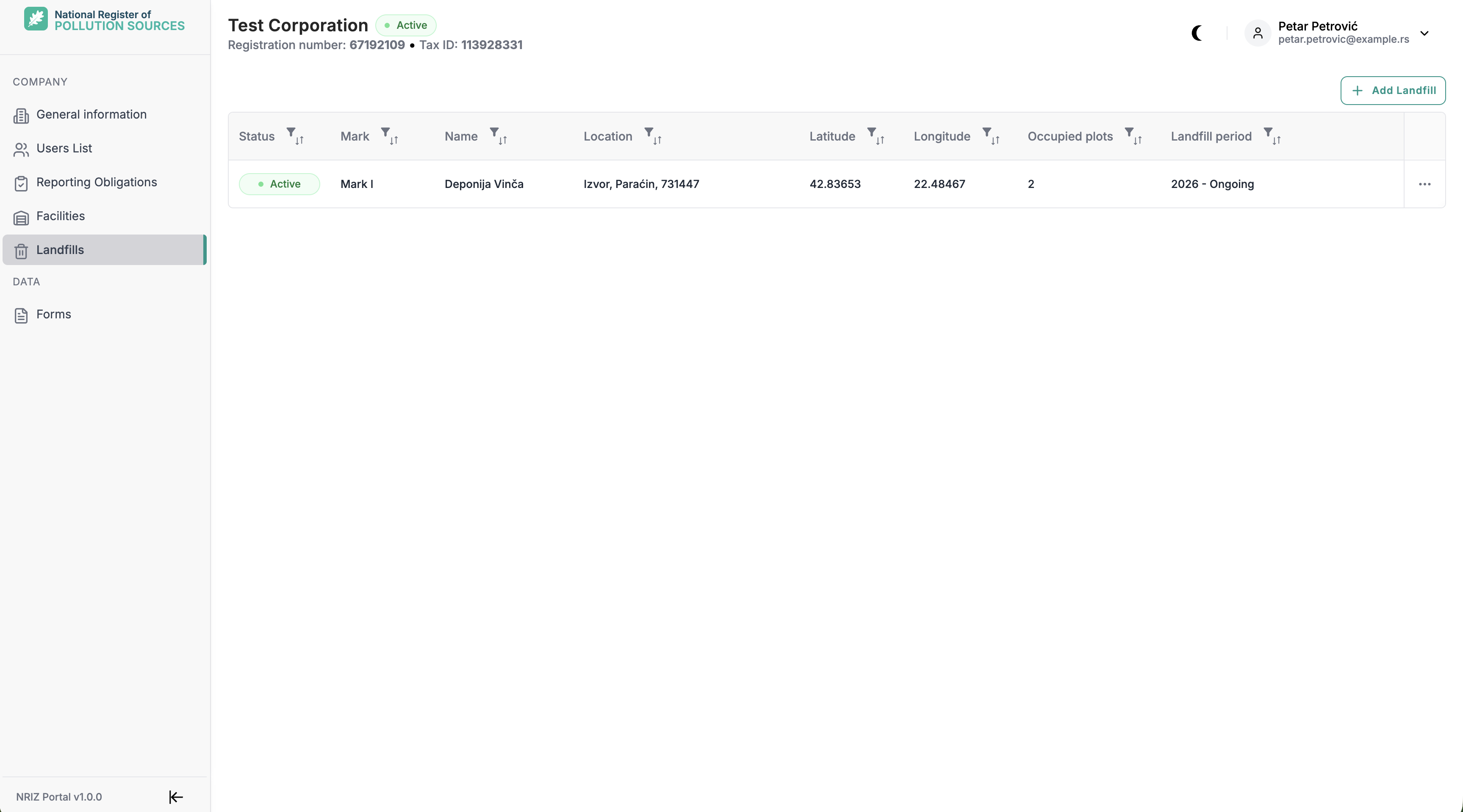
Create a landfill
Only Company Admin can create a landfill, and only when all of the following apply:
- the company is active
- the company has a DEP1 reporting obligation
- no other landfill row is already being edited
A new record is created with status Active. After save, it can be selected on a new DEP1 form.
If Add Landfill is disabled, the usual causes are an inactive company or a missing DEP1 obligation.
When creating as Company Admin:
- Open Landfills.
- Select Add Landfill.
- Fill the required fields in the new row.
- Save. Discard cancels the unsaved row.
What to enter, and when:
| Field | When / why |
|---|---|
| Mark | Short unique code for this landfill within the company. Another landfill of the same company cannot use the same mark. |
| Name | Descriptive name of the site, so it can be recognised on DEP1. |
| Location | Municipality or place from the location list. |
| Latitude, Longitude | Geographic coordinates of the site. |
| Occupied plots | Cadastral parcels occupied by the landfill. |
| Landfill period | Year depositing started (required, from 1980 up to the current year) and year it ended, or Ongoing. The end year cannot be before the start year. |
Landfills are not deleted in the portal.
Edit an existing landfill
Only Company Admin can edit landfill data. For other users who can open the list, the table is read-only.
Only an active landfill can be edited.
When editing as Company Admin:
- Open Landfills.
- Open the row menu and select Edit.
- Change the fields that need updating.
- Save. Discard cancels unsaved changes.
Status
Each landfill is Active or Inactive. Inactive landfills stay in the list for history. They cannot be edited and cannot be selected on new DEP1 forms. Existing DEP1 forms keep the landfill data.
Common issues
| Situation | Action |
|---|---|
| No Landfills item under My company | The company has no DEP1 obligation and no existing landfill records. If DEP1 reporting is expected, contact NRIZ support |
| List is empty | Company Admin can add a landfill when the company is active and DEP1 applies. Other roles cannot add records |
| Add Landfill is disabled | Only Company Admin can add. The company must be active and have a DEP1 obligation. Add is also disabled while another row is being edited |
| Cannot save a new row | Required fields may be empty, the mark may already exist on another landfill of the company, coordinates may be out of range, or the end year is before the start year |
| Edit is not available | Only Company Admin can edit; other roles see read-only. Inactive landfills cannot be edited |
| Landfill exists but cannot be selected on DEP1 | The landfill must be Active. Inactive sites are not offered on new DEP1 forms |
| Cannot activate or deactivate a landfill | Status changes are done by a NRIZ administrator |
Related: Facilities. Next: Users and access (Company Admin).