The portal lists facilities linked to the company. A company may have no facilities, or several. Facility-level forms and pollution sources belong to a specific facility, not to the company record alone.
Based on answers in the Survey during company registration, a facility may already be created for the company.
Anyone with access to the company can open the facilities list. Opening a facility detail is limited to Company Admin and to users who were explicitly granted access to that facility.
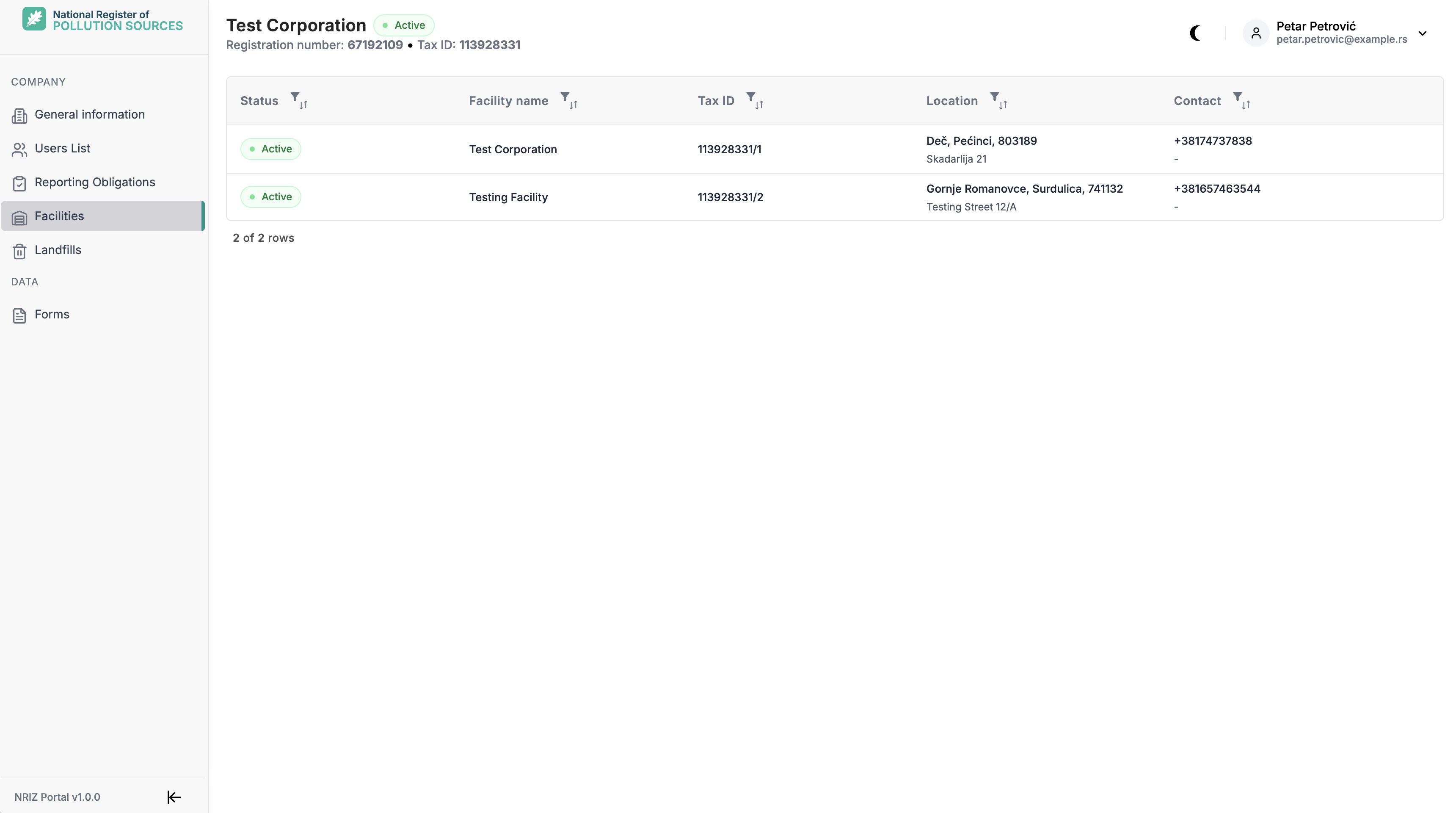
Edit an existing facility
Only Company Admin can edit facility data. For other users who can open the facility detail, the screen is read-only.
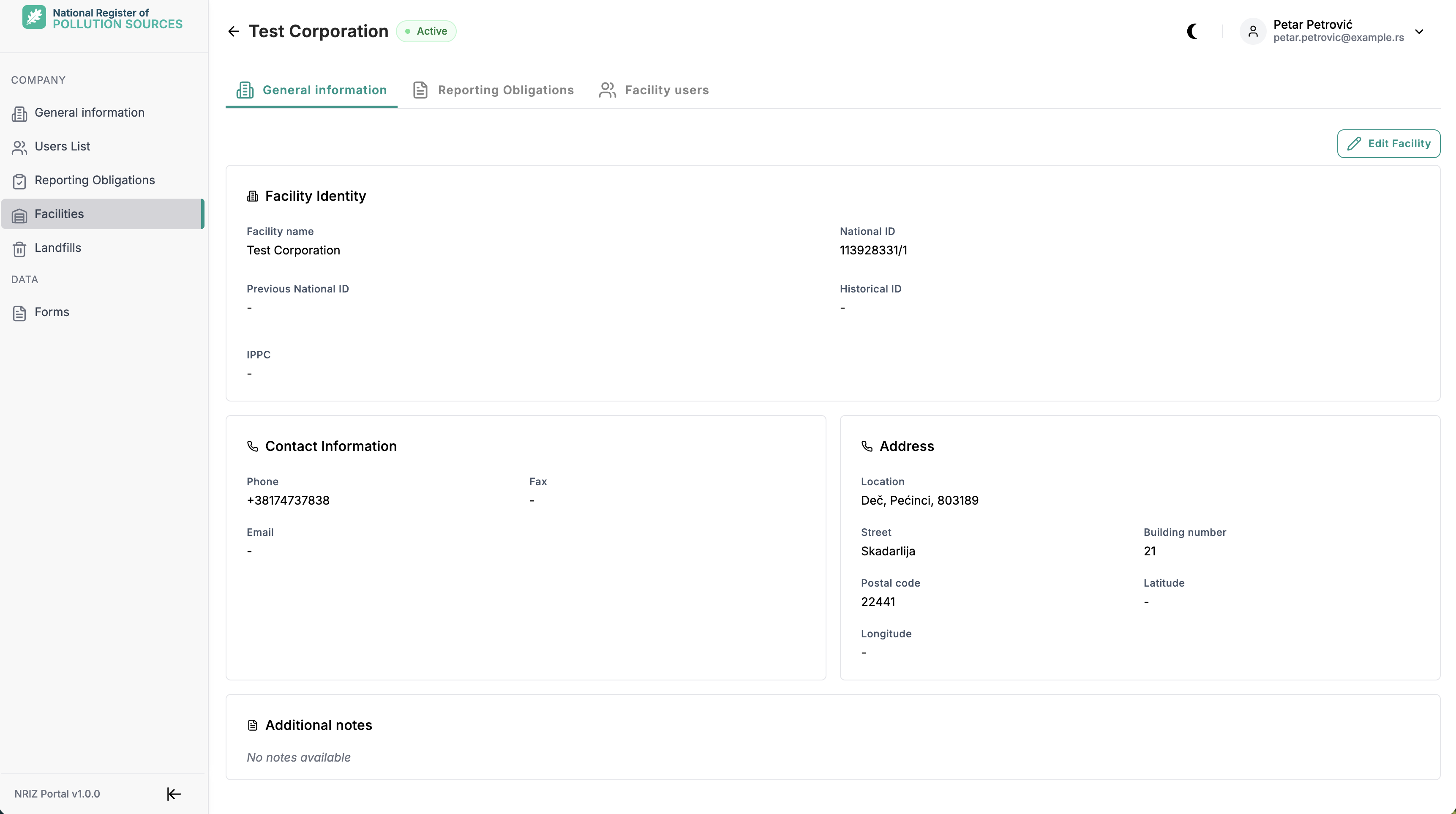
Except National ID and Historical ID, any facility data on this screen can be changed by Company Admin.
These fields are required and must be filled:
- Facility name
- Phone
- Address
When editing as Company Admin:
- Open Facilities.
- Select the facility.
- Select Edit where available.
- Change the fields that need updating (except National ID and Historical ID).
- Save. Discard cancels unsaved changes.
Opening detail requires Company Admin rights or an explicit grant for that facility.
Reporting obligations
On the facility detail, the Reporting obligations tab lists facility-level obligations in the same groups as in the portal. Anyone who can open that facility — Company Admin and facility users with access to it — can view the tab. Only obligations marked Active apply to that facility. The tab is informational and read-only; obligations cannot be changed in the portal.
Company-level obligations (packaging, landfills, special streams) are listed under My company → Reporting obligations. See Company data.
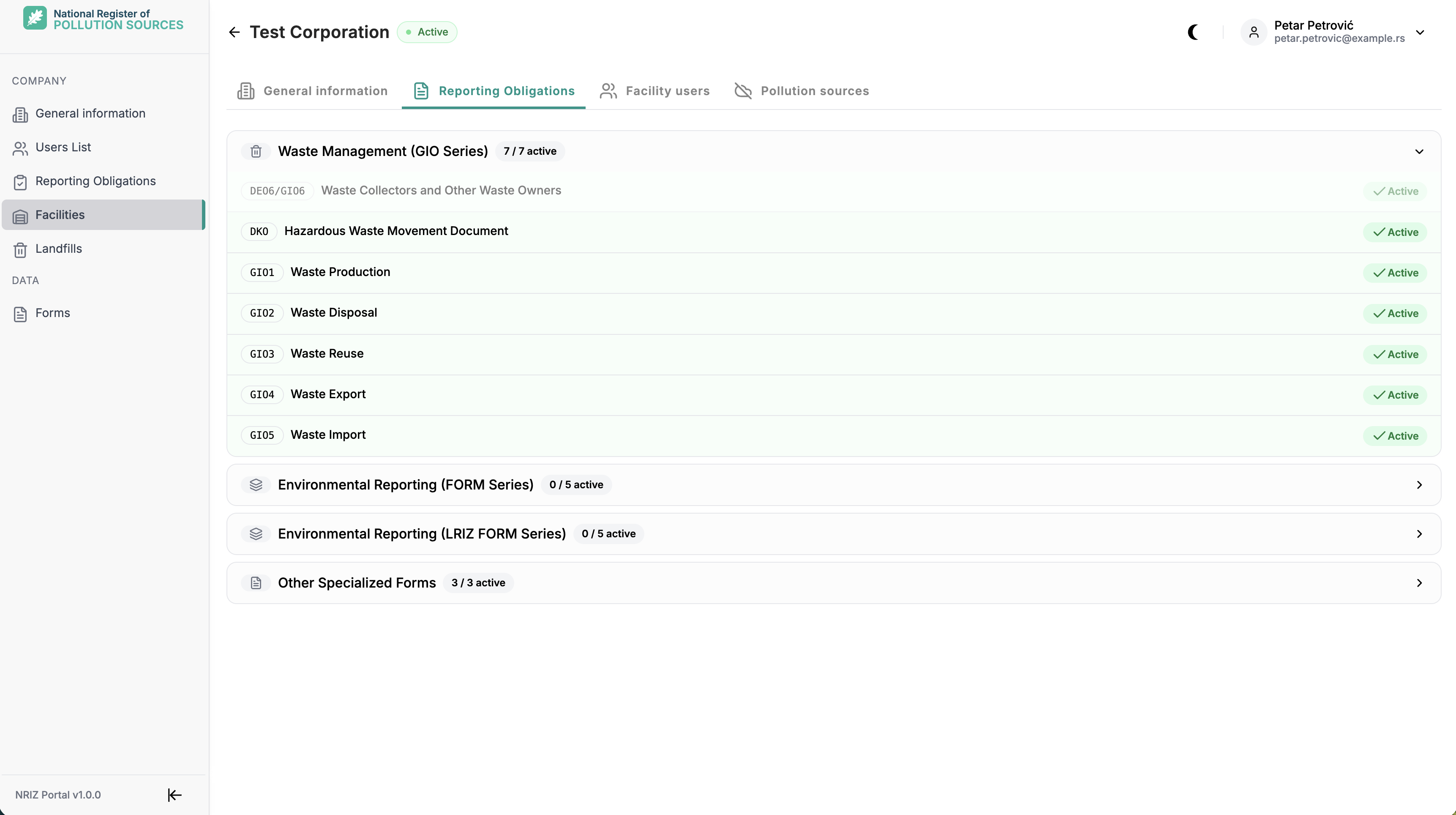
A facility may have several active obligations at once. The FORM series (national register) and the LRIZ FORM series (local register) are not assigned together.
Waste Management (GIO Series)
| Obligation | What it covers |
|---|---|
| GIO1 | Waste production when the facility is not in the NRIZ or LRIZ waste-production series. |
| GIO2 | Waste disposal. |
| GIO3 | Waste reuse and recovery. |
| GIO4 | Waste exported from the country. |
| GIO5 | Waste imported into the country. |
| DEO6/GIO6 | Waste collection and stock movements by collectors and other waste owners (by date). |
| DKO | Movement of hazardous waste (by event). |
Environmental Reporting (FORM Series)
National register (major polluters):
| Obligation | What it covers |
|---|---|
| FORM 1 | Facility identification and operational data. |
| FORM 2 | Air pollutant emissions from air pollution sources. |
| FORM 3 | Water pollutant discharges from water outlets. |
| FORM 4 | Soil contamination from soil sources. |
| FORM 5 | Waste production. |
Environmental Reporting (LRIZ FORM Series)
Local register (local polluters) — the same topics as FORM 1–5:
| Obligation | What it covers |
|---|---|
| LRIZ FORM 1 | Facility identification and operational data. |
| LRIZ FORM 2 | Air pollutant emissions from air pollution sources. |
| LRIZ FORM 3 | Water pollutant discharges from water outlets. |
| LRIZ FORM 4 | Soil contamination from soil sources. |
| LRIZ FORM 5 | Waste production. |
Other Specialized Forms
| Obligation | What it covers |
|---|---|
| GVE | Detailed air emission measurements from air pollution sources. |
| OTV | Wastewater measurements and tests from water outlets. |
| KOM1 | Municipal waste. |
Facility users
On the facility detail, the Facility users tab lists people with access to that facility. Anyone who can open that facility — Company Admin and facility users with access to it — can open the tab.
Only Company Admin can assign facility users. The facility must be active.
Company Admin can grant facility access in two ways:
- Invite a new user directly to that facility — send an invitation with facility access for the selected site. See Invite a user under Users and access.
- Add an existing company user — on the facility Facility users tab, select a person who already has an association with the company and grant them access to this facility.
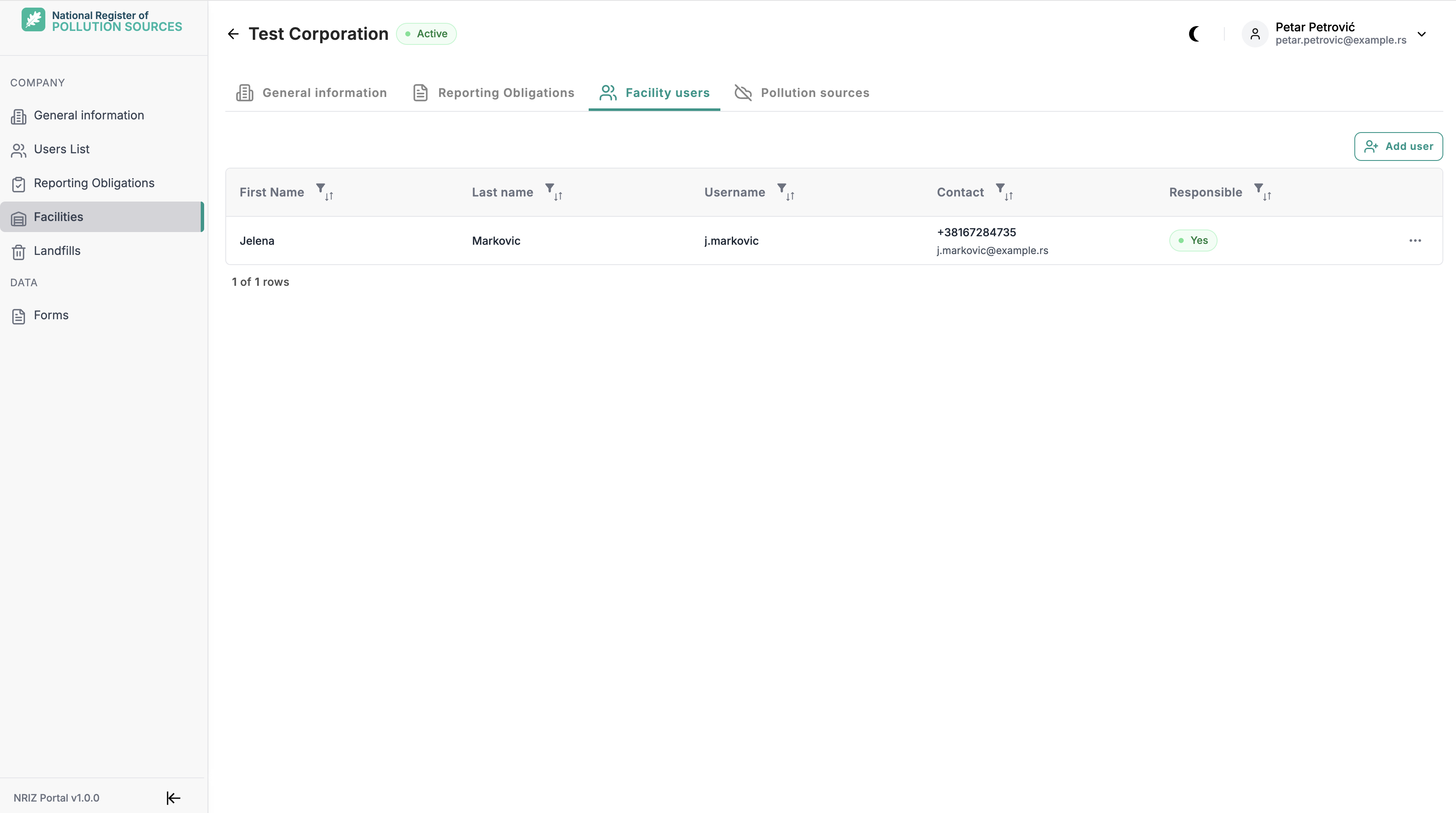
Responsible person
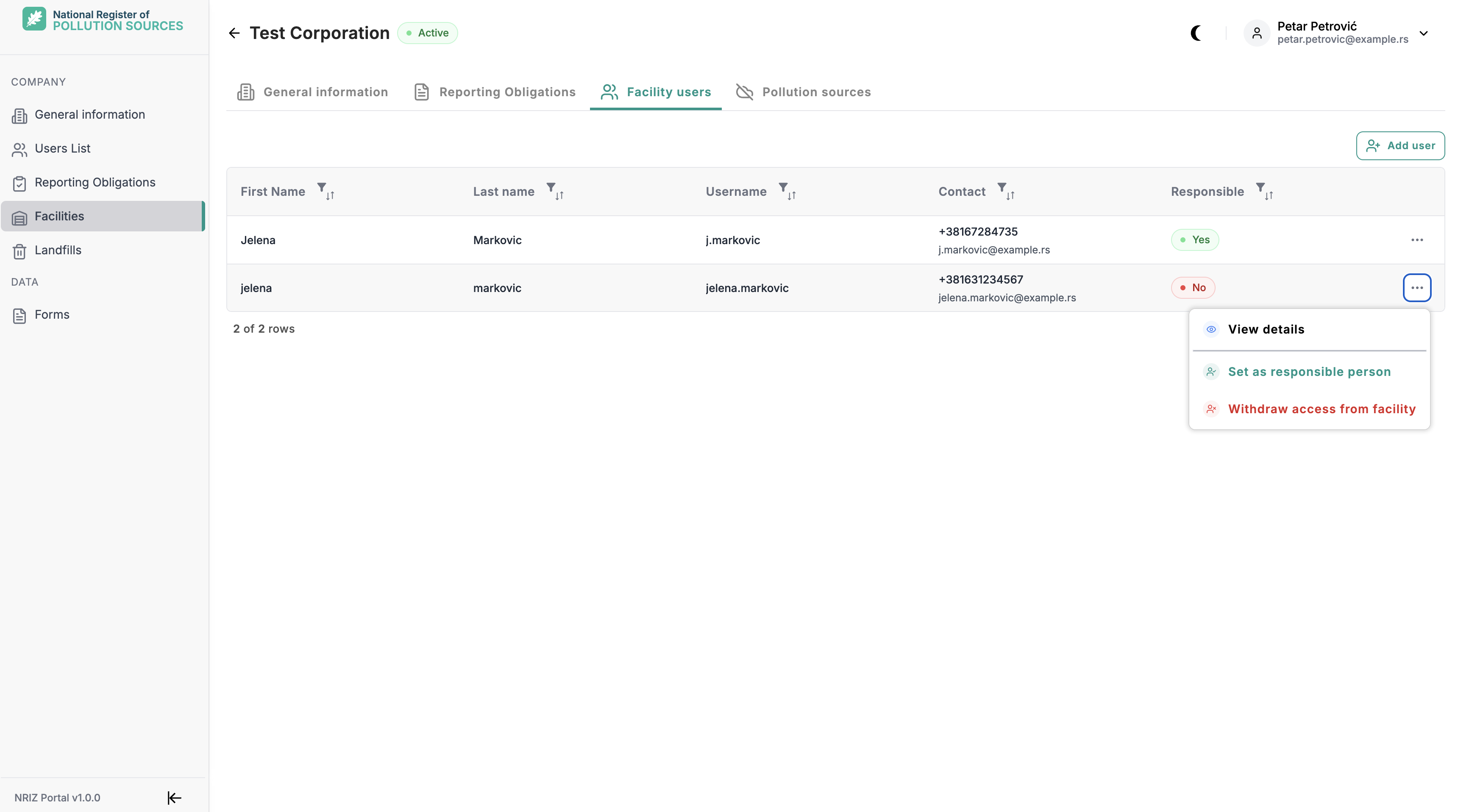
Each facility has exactly one responsible person — the main responsible user for that facility. The designation appears in the facility user list (Responsible column). That person’s name is used in facility reporting (for example on PDF output).
When the first user is assigned to a facility that has no responsible person yet, that user becomes the responsible person automatically.
Only Company Admin can change who the responsible person is. In the facility users table, open the row menu for another active facility user and select Set as responsible person.
Withdraw facility access
Only Company Admin can withdraw a person’s access to the facility. In the facility users table, open the row menu and select Withdraw access from facility.
Access cannot be withdrawn from the current responsible person until responsibility is transferred to another active facility user on that facility (Transfer responsibility). After the transfer, access for the previous responsible person can be withdrawn.
Pollution sources
On the facility detail, the Pollution sources tab lists emission sources that belong to that facility. Anyone who can open that facility — Company Admin and facility users with access to it — can open the tab.
The tab appears when the facility has a related air, water, or soil reporting obligation, or when sources already exist. Sources are grouped by medium. A group is shown when that medium’s obligation applies or when sources of that type already exist.
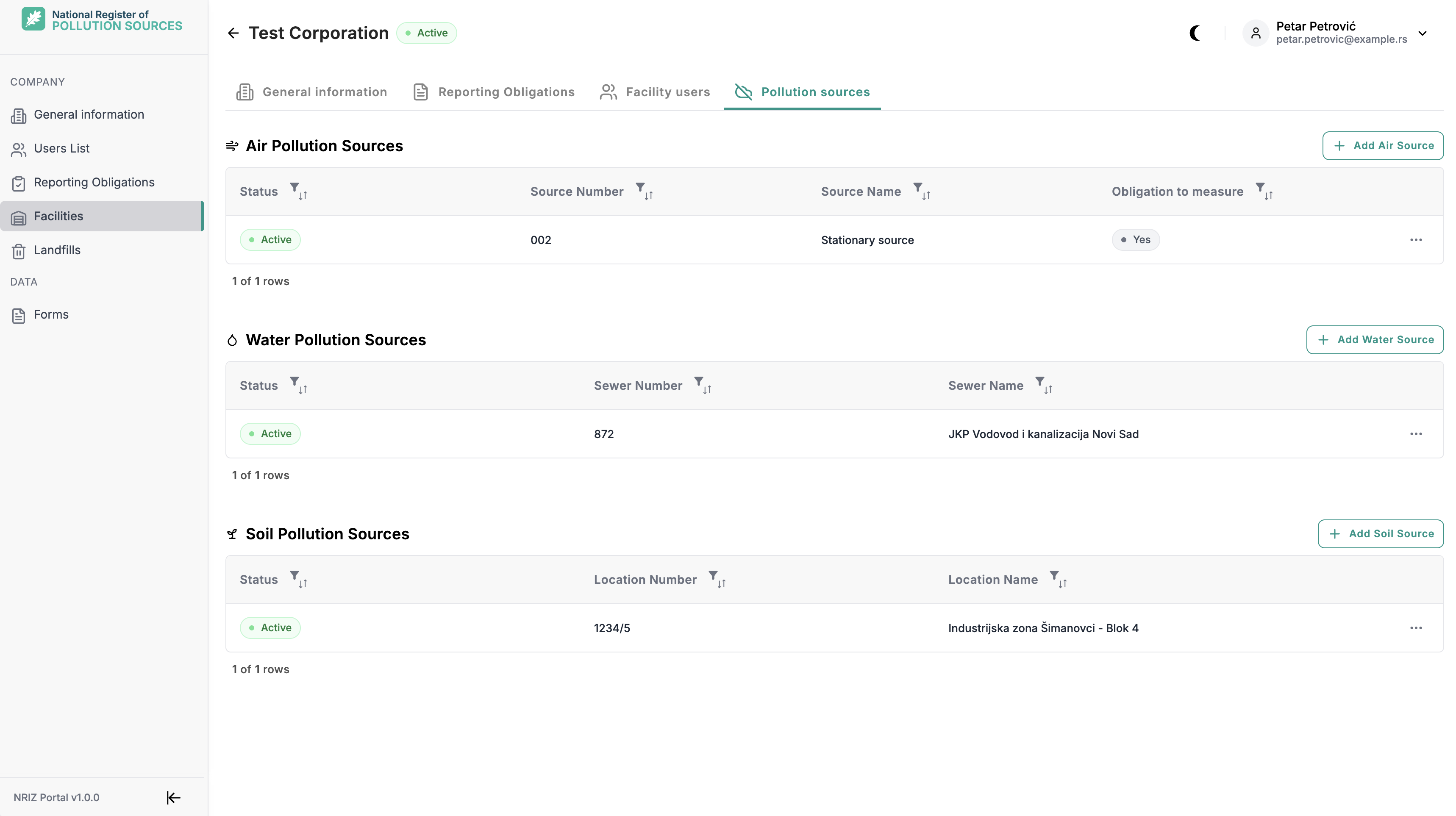
Only Company Admin can add a source and edit an existing active source from the row menu, when the facility is active. Pollution sources are not deleted in the portal. Inactive sources cannot be edited until they are active again.
Air pollution sources
The Air pollution sources group is available when the facility has an active Air Emissions reporting obligation — FORM 2, LRIZ FORM 2, or GVE — or when air sources already exist.
Air sources identify stacks or emission points used later on air emission forms. Each form is linked to one air source for that facility and year.
Only Company Admin can use Add Air Source and edit an active air source when the facility is active.
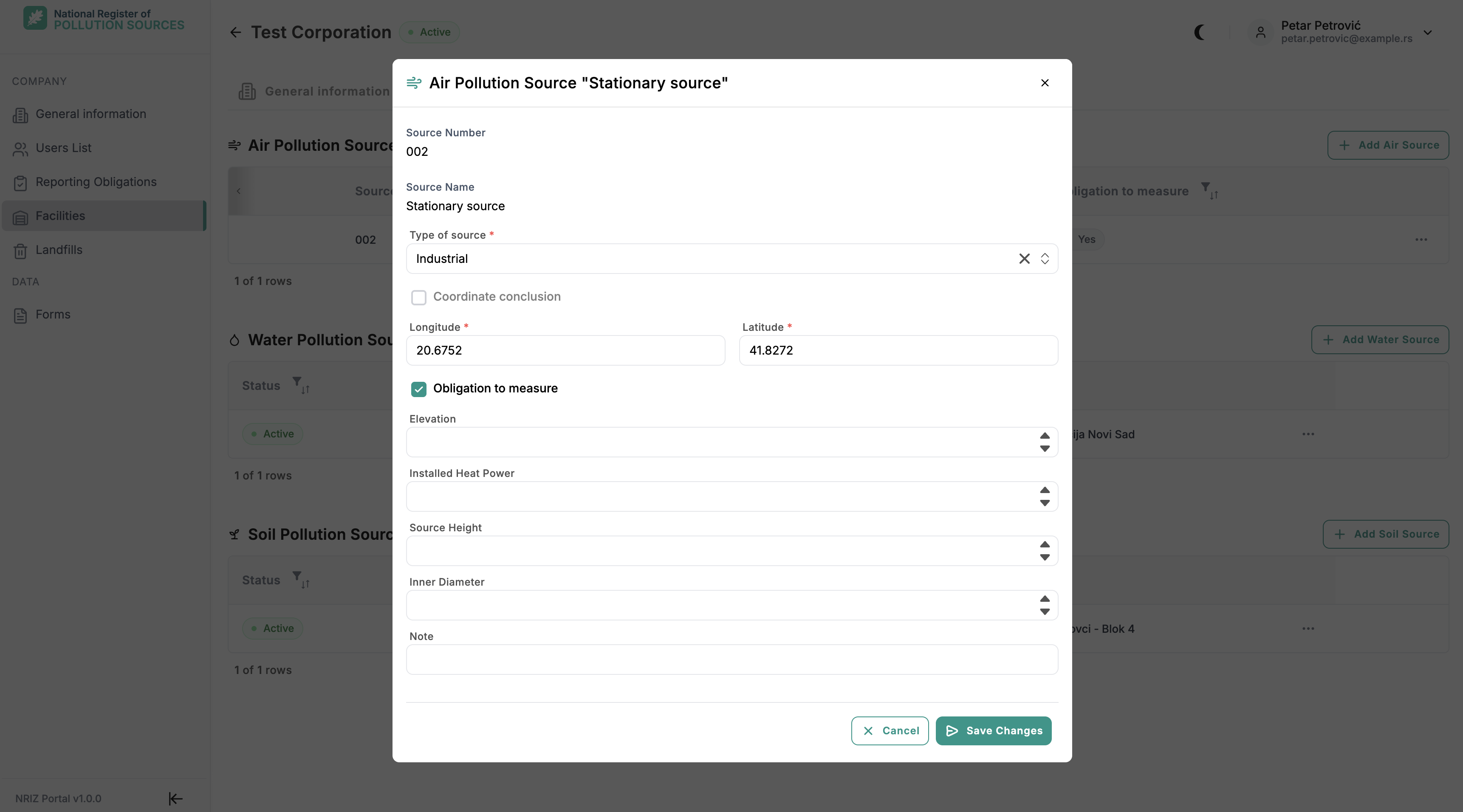
What to enter, and when:
| Field | When / why |
|---|---|
| Source Number, Source Name | Set when creating the source so it can be selected on air emission forms. After create, these values cannot be changed. |
| Type of source | Required. Describes the kind of emission point (for example Industrial or Energy). |
| Longitude, Latitude | Location of the source. Enter accurate coordinates so NRIZ can verify them. |
| Obligation to measure | Whether measurement is required for this source. |
| Elevation, Source Height, Inner Diameter | Technical attributes of the source used in air reporting. |
| Installed Heat Power | Required when Type of source is Energy; otherwise optional. |
| Note | Optional free text. |
Coordinate conclusion is set only by a NRIZ administrator after coordinates are verified. Once it is set, Longitude and Latitude cannot be changed. Only a NRIZ administrator can deactivate (or reactivate) an air source.
Water pollution sources
The Water pollution sources group is available when the facility has an active Water Emissions reporting obligation — FORM 3, LRIZ FORM 3, or OTV — or when water sources already exist.
Water sources identify discharge outlets (sewers) used later on water emission forms and related water registers. Each form or register entry is linked to one water source for that facility.
Only Company Admin can use Add Water Source and edit an active water source when the facility is active.
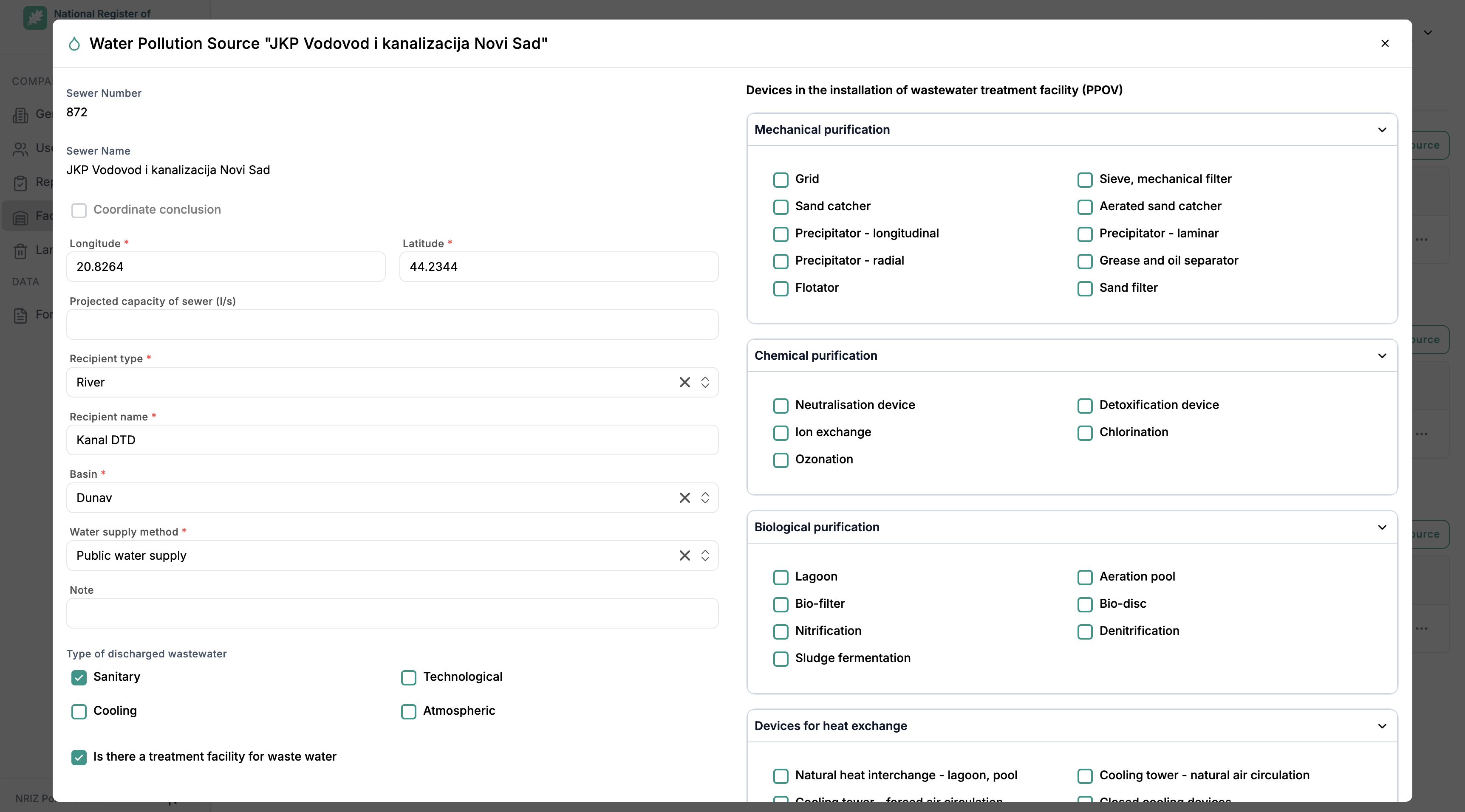
What to enter, and when:
| Field | When / why |
|---|---|
| Sewer Number, Sewer Name | Set when creating the outlet so it can be selected on water emission forms. After create, these values cannot be changed. |
| Longitude, Latitude | Location of the outlet. Enter accurate coordinates so NRIZ can verify them. |
| Projected capacity of sewer (l/s) | Design capacity of the outlet, when known. |
| Recipient type, Recipient name, Basin | Required. Identify where the wastewater is discharged and which river basin applies. |
| Water supply method | Required. How the facility is supplied with water (public water supply or other sources). |
| Type of discharged wastewater | At least one type must be selected: Sanitary, Technological, Cooling, or Atmospheric. |
| Is there a treatment facility for waste water | When checked, mark which PPOV treatment devices are present (mechanical, chemical, biological, heat exchange). At least one device is required if treatment exists. |
| Note | Optional free text. |
Coordinate conclusion is set only by a NRIZ administrator after coordinates are verified. Once it is set, Longitude and Latitude cannot be changed. Only a NRIZ administrator can deactivate (or reactivate) a water source.
Soil pollution sources
The Soil pollution sources group is available when the facility has an active Soil Emissions reporting obligation — FORM 4 or LRIZ FORM 4 — or when soil sources already exist.
Soil sources identify locations where pollutants in waste discharged to soil are reported. Each soil emission form is linked to one soil source for that facility and year.
Only Company Admin can use Add Soil Source and edit an active soil source when the facility is active.
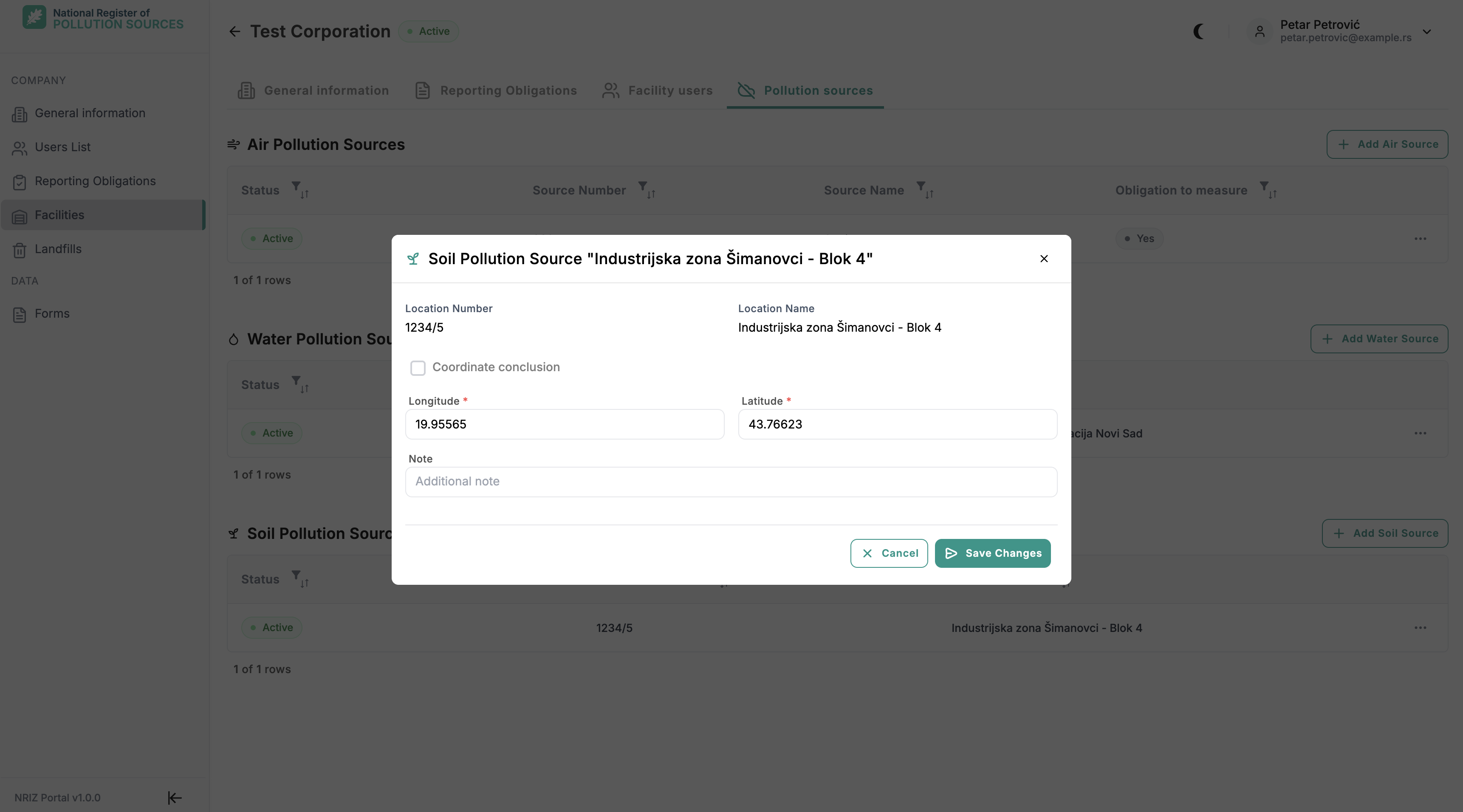
What to enter, and when:
| Field | When / why |
|---|---|
| Location Number, Location Name | Set when creating the location so it can be selected on soil emission forms. After create, these values cannot be changed. |
| Longitude, Latitude | Location of the soil source. Enter accurate coordinates so NRIZ can verify them. |
| Note | Optional free text. |
Coordinate conclusion is set only by a NRIZ administrator after coordinates are verified. Once it is set, Longitude and Latitude cannot be changed. Only a NRIZ administrator can deactivate (or reactivate) a soil source.
Common issues
| Situation | Action |
|---|---|
| No facilities in the list | A company may have none. If a facility is required, contact NRIZ support — additional facilities are created by a NRIZ administrator |
| Facility exists but forms are missing | Check the facility Reporting obligations tab and grants; see Forms when available |
| Facility is inactive | New work on that site may be blocked until NRIZ reactivates it |
| Facility is in the list but detail will not open | Detail needs Company Admin rights or an explicit grant for that facility |
| Edit is not available on the facility | Only Company Admin can edit facility data; other roles see read-only |
| Reporting obligations cannot be changed | The tab is read-only; only a NRIZ administrator assigns facility obligations |
| Cannot add a facility user | Only Company Admin can assign facility users; the facility must be active. Invite a new person with facility access, or add someone who already has a company association |
| Cannot withdraw the responsible person | Transfer responsibility to another active facility user first (Transfer responsibility) |
| Cannot change responsible person or withdraw access | Only Company Admin can use Set as responsible person and Withdraw access from facility in the facility users table |
| Pollution sources tab is empty or missing | The facility may have no air, water, or soil reporting obligation and no existing sources — contact NRIZ support if a source group is expected |
| Cannot add or edit a pollution source | Facility must be active; only Company Admin can add or edit; inactive sources cannot be edited |
| Source number or name cannot be changed | After creation, number and name are fixed for that source |
| Longitude or latitude cannot be changed | A NRIZ administrator has set Coordinate conclusion after verifying the coordinates |
| Cannot activate or deactivate a pollution source | Status changes are done by a NRIZ administrator |
| Save is blocked | Required fields may be empty — facility name, phone, and address |